TL;DR
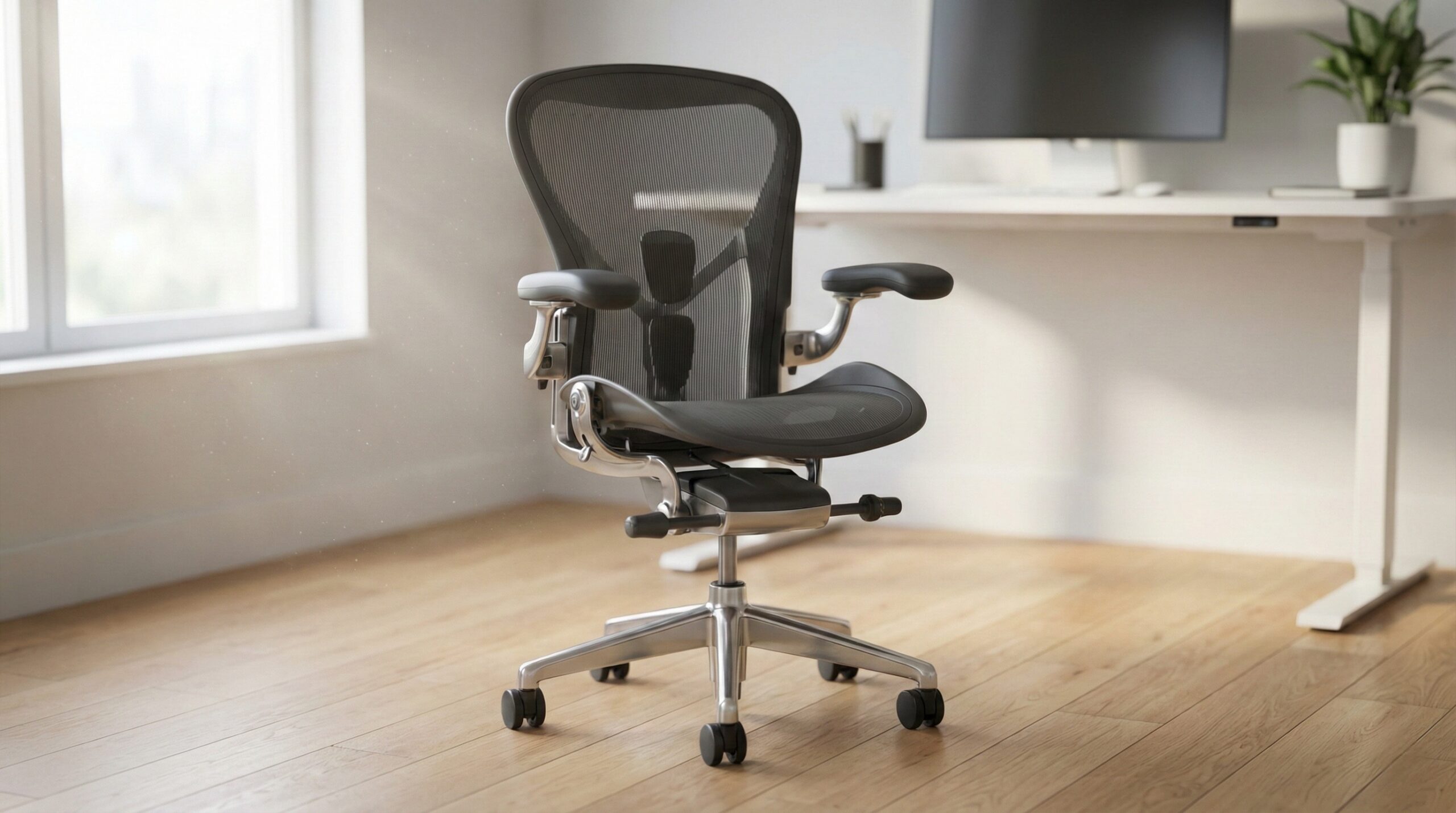
The best office chair for back pain is the one you can actually fit to your body, especially at the lumbar support, seat depth, armrests, and recline. For most home office workers, the strongest premium option here is the Herman Miller Aeron Size B if its sizing works for you and you’re willing to spend time dialing in the setup.
If you shop this category, don’t assume a high price alone will fix discomfort. Evidence from OSHA computer workstations and CDC NIOSH ergonomics points in the same direction: adjustability and fit matter more than branding.
What Office Chairs for Back Pain Actually Are
An office chair for back pain is not just a padded seat with an “ergonomic” label. In practical terms, it’s a task chair built to support a more neutral sitting posture and let you tune key contact points so the chair matches your body instead of forcing you into one fixed shape.
That usually means adjustable lumbar support, seat height, arm height, recline tension, and tilt settings at a minimum. Better models also offer seat-depth adjustment or at least dimensions that fit your leg length well. Those details matter because back pain at a desk is often tied to poor support, perching forward, hunching the shoulders, or sitting with the pelvis rolled backward for hours at a time.
For home office use, the biggest buying mistake is chasing softness instead of support. A very plush chair can feel nice for a few minutes but still leave your lower back unsupported over a full workday. Research-backed ergonomics guidance from OSHA workstation chairs and Cornell ergonomics research suggests that a good chair should help you sit all the way back, keep your feet supported, and let your arms rest without lifting your shoulders.
The formula is simple: look for lumbar support you can place at your natural lower-back curve, a seat depth that leaves about two to three fingers of space behind your knees, and armrests that support your forearms during typing without pushing your shoulders up. Recline also matters. A chair that supports upright work and a slight recline can reduce the strain of holding one rigid position all day.
Material choice is secondary. Mesh can feel cooler and more breathable, while padded seats may feel better for pressure distribution depending on your hips and thighs. Neither is automatically better for back pain. What matters is whether the seat and back let you stay supported for long sessions without numbness, thigh pressure, or the urge to scoot forward away from the backrest.
It’s also worth saying clearly: an ergonomic chair is not medical treatment. If pain is persistent, worsening, or radiating down the leg, it makes sense to check with a clinician, physical therapist, certified ergonomist, or occupational therapist. A chair can improve workstation support, but it cannot diagnose or treat a serious underlying issue.
Who Office Chairs for Back Pain Fits Best
This category fits people who spend long hours at a desk and know their current chair is part of the problem. If your lower back gets achy by midday, your shoulders creep upward while typing, or you tend to sit on the front edge of the seat because the backrest never feels quite right, a more adjustable ergonomic chair can make a real difference.
It also fits buyers who are willing to treat setup as part of the purchase. With back-pain seating, the benefit usually comes from getting the fit right: seat height, seat depth, lumbar position, armrest height, and recline tension all need a little trial and error. Premium chairs reward that effort more than they reward impulse buying.
The strongest match here is the Herman Miller Aeron Size B for average-size users who want a well-known ergonomic design, breathable seating, and long-term durability potential. User feedback around this model often centers on long ownership and dependable day-to-day support when the size is correct. One buyer summed up the overall satisfaction clearly: “I was somewhat worried after reading the other reviews (after purchasing the chair 🙂) but it came in yesterday and I have to say I am happy with my purchase.” — verified buyer, 5 stars
This kind of chair is especially well suited to:
- Full-time remote workers who sit for most of the workday
- Users who want independent arm, recline, and height adjustments
- People who run hot and prefer a mesh seat/back feel
- Buyers willing to verify sizing before ordering
- Anyone replacing a basic chair that only adjusts in height
It can also be a good fit for part-time sitters if durability matters and budget allows. If you only work from home a few days a week, a premium chair can still make sense, but only if you’ll actually spend time adjusting it. A badly configured expensive chair can feel worse than a cheaper one that happens to fit you better.
In short, this category is best for people who want support rather than softness, and who understand that back-pain relief in a desk chair usually comes from fit and posture support, not from a plush cushion or prestige badge.
Who Should Skip Office Chairs for Back Pain
You should skip this category, or at least be more cautious, if you want instant comfort with no setup period. Ergonomic chairs often feel different from lounge-style office chairs because they’re designed to support posture, not let you sink in. If you strongly prefer a soft, cushy seat and don’t plan to adjust anything beyond seat height, a premium ergonomic model may disappoint you.
These chairs are also a weaker fit for buyers who ignore sizing. That matters a lot with the Aeron in particular. If the seat pan is too deep, you may perch forward and lose lower-back contact. If the lumbar support lands too high or too low, it can feel intrusive instead of helpful. For some people, that mismatch can make symptoms feel worse rather than better.
You may also want to skip used or renewed options if you’re not comfortable checking for worn cylinders, damaged controls, or missing parts. Back-pain chairs rely on adjustment hardware working properly. If recline, tilt, or arm controls are faulty, the chair can lose much of the value you paid for.
Buyer feedback also points to quality-control and condition risks on marketplace listings. One critical review on the Aeron put it bluntly: “Lever handle broke off almost immediately, cable for leaning function never worked from the start, and they never sent a cover for the bottom cable assembly.” — verified buyer, 1 star
This category may also not be the best first move if your pain includes numbness, tingling, sharp nerve pain, or symptoms that keep getting worse. In that case, it’s smarter to talk with a clinician or physical therapist first. A chair can support healthier sitting, but it should not be used as a substitute for medical evaluation when symptoms suggest something more serious.
You should probably look elsewhere if:
- Your budget tops out far below premium ergonomic pricing
- You want a very plush executive-chair feel
- You are between sizes and can’t verify fit confidently
- You dislike mesh seating on pressure points
- You expect the chair to fix pain without changing your setup habits
Price and Value
For the products here, pricing starts in the premium tier. The Herman Miller Aeron Size B listing sits around $650 to $700, which is expensive for a home office chair by any standard. The Mirra 2 is also positioned as a premium ergonomic chair, though the pricing provided here is less clear and can vary by seller and configuration.
That means value comes down to three questions:
- Does the chair fit your body well enough to use the backrest fully?
- Do you need the adjustment range for daily or near-daily desk work?
- Are you buying for long-term use rather than occasional seating?
If the answer is yes to all three, premium pricing can be justified. The Aeron’s value case is strongest for people who work long hours at a desk and want a chair with a long service life reputation. Home office worker reviews often mention chairs from this line lasting many years, which matters when you spread the cost across daily use.
That said, expensive does not automatically mean better for back pain. A $700 chair that is the wrong size or never properly adjusted can be poor value. By contrast, a chair with the right lumbar height, correct seat depth, and usable recline controls can deliver more real-world relief even if it is less famous. This is why we’d treat price as the last filter, not the first one.
Also factor in the risks of buying marketplace or renewed inventory. A lower upfront price may be offset by worn mechanisms, imperfect refurbishment, or tricky returns. On a chair category where support depends on working controls, those tradeoffs matter more than they do on simpler furniture.
For most shoppers, the best value isn’t “the cheapest chair with lumbar support” or “the most expensive chair available.” It’s the model that gives you enough adjustment to match your body and keeps that support consistent over time.
Common Mistakes When Trying Office Chairs for Back Pain
The biggest mistake is buying on reputation alone. The Aeron, for example, has a strong ergonomic reputation, but that doesn’t override fit. If the size is wrong or the lumbar support shape doesn’t agree with your back, you may end up wondering why a premium chair feels underwhelming.
The second mistake is ignoring seat depth. A lot of buyers focus only on lumbar support, but seat depth often determines whether you can sit all the way back and actually use that lumbar support. If the front edge presses into the back of your knees, you’re likely to scoot forward and lose the benefit of the backrest.
Third, buyers often leave the chair close to factory settings. That usually means the recline is too loose or too stiff, the arms sit too high, or the lumbar position is never really tested. Back-pain chairs tend to work better after a few days of small changes, not after one quick sit.
Another common mistake is assuming mesh is always the answer. Some users love the cooler, springier feel. Others find mesh less forgiving on the hips or thighs. Pressure comfort is personal. If you already know you’re sensitive to firm seating, don’t ignore that preference just because a mesh chair has a great reputation.
There’s also a buyer expectation problem: some people want immediate relief the moment they sit down. But switching from a poor chair to a more supportive one can involve a short adjustment period as your posture changes. That’s normal up to a point. What’s not normal is sharp pain, tingling, or clear worsening symptoms.
One useful owner reminder comes straight from buyer feedback: “I was somewhat worried after reading the other reviews (after purchasing the chair 🙂) but it came in yesterday and I have to say I am happy with my purchase.” — verified buyer, 5 stars. The takeaway is not just that the chair worked for this user, but that real-world results often depend on the actual condition and setup you receive, not just the model name.
To avoid the most common mistakes, do this after unboxing:
- Set seat height so feet are flat and knees are roughly level with or slightly below hips
- Check for two to three fingers of space behind the knees
- Move lumbar support so it matches the natural inward curve of your lower back
- Set armrests so elbows can rest near 90 degrees without shoulder shrugging
- Adjust recline tension so the chair supports you rather than dropping you backward
- Revisit settings after a few work sessions
If you’re still uncomfortable after careful adjustments, that’s usually a sign to reassess fit, desk height, monitor placement, or whether the chair’s shape simply doesn’t suit your body.
FAQ
What is the most important feature in a desk chair for back pain?
Adjustable lumbar support is usually the top priority, especially if you can move it to match your own spinal curve. Right behind that is seat depth, because even excellent lumbar support won’t help much if the seat is so long that you can’t sit back into the chair properly.
How do I know if seat depth is right?
Sit all the way back in the chair and check the gap between the seat edge and the back of your knees. You generally want about two to three fingers of space. That guideline lines up with ergonomic setup advice from OSHA workstation chairs.
Is a more expensive office chair always better for back pain?
No. A premium chair only helps if it fits your height, leg length, and back shape, and if you actually adjust it correctly. Price often buys better materials and more adjustment range, but it does not guarantee comfort or relief on its own.
Should I choose mesh or a cushioned seat?
Choose the surface that feels better on your body over long sessions. Mesh can feel cooler and more breathable, while cushioned seats may feel better for pressure distribution. There isn’t one universal winner for back pain, so personal comfort matters.
Are adjustable armrests really necessary?
Yes, for many desk workers. Armrests that support your forearms can reduce shoulder and upper-back strain while typing and mousing. Guidance from CDC NIOSH ergonomics and OSHA both supports the idea that workstation fit affects musculoskeletal strain.
Can the wrong chair size make back pain worse?
Absolutely. If the seat is too deep, the backrest may never support you properly. If the back shape or lumbar height lands in the wrong place, it can feel like pressure in exactly the wrong spot. On chairs with multiple sizes, sizing is a major part of the buying decision, not a minor detail.
How should I set up my chair for lower-back support?
Start with feet flat on the floor, knees roughly level with or slightly below your hips, then adjust seat depth so you can sit fully back. After that, move the lumbar support until it fits the natural inward curve of your lower back, and fine-tune recline and arms from there. If you want a general setup reference, OSHA computer workstations is a helpful starting point.
When should I talk to a professional instead of just buying a new chair?
If your pain is persistent, worsening, radiating down the leg, or comes with numbness or tingling, it’s time to check with a clinician, physical therapist, certified ergonomist, or occupational therapist. A better chair can improve support, but it should not be your only response to serious symptoms.
Looking for these on Amazon? Browse office chair for back pain on Amazon →
Bottom Line
If you want an office chair for back pain, focus on fit first: adjustable lumbar support, correct seat depth, usable armrests, and a recline you can fine-tune. Among the options here, the Herman Miller Aeron Size B stands out as the strongest premium pick for buyers whose body size matches it and who want durable all-day ergonomic support.
Just remember that no chair earns its price tag through reputation alone. The right setup, the right size, and a chair shape that agrees with your body are what actually make a difference.
Affiliate disclosure: This page includes affiliate links. Purchases through these links support our work at no added cost.