TL;DR
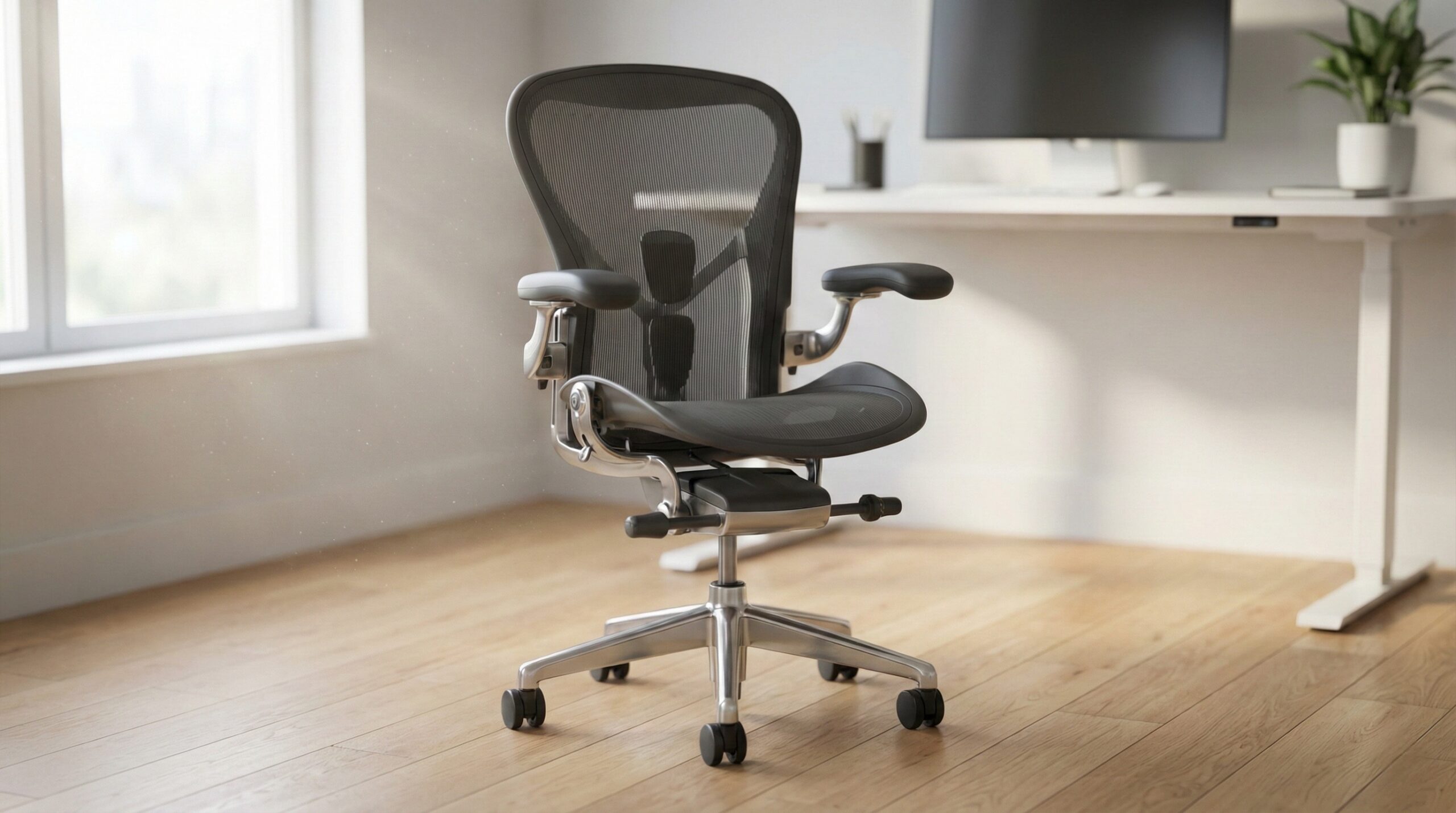
The Branch Ergonomic Chair is a solid mid-priced pick if you want a breathable mesh back, adjustable lumbar support, and the core controls most home office workers actually use. The big “if”: fit and tolerance — some user reports mention creaks/noises, so it’s best for buyers who can live with a little imperfection (and who are comfortable with the return/warranty terms).
What a “Branch ergonomic chair” Actually Is
When people search “Branch ergonomic chair,” they’re usually talking about Branch’s flagship ergonomic task chair (often listed simply as “Branch Ergonomic Chair”). In practical terms, it’s a modern, mid-range ergonomic office chair designed to cover the essentials — lumbar support, adjustable armrests, tilt/recline controls, and a breathable back — without moving into premium-chair pricing.
It helps to think of this category using a simple formula:
Ergonomic chair value = fit + usable adjustments + build tolerance + low-risk buying.
- Fit is the foundation. Seat depth, seat width, and back height decide whether your body “lands” correctly on the chair. If the seat is too deep, it can press behind your knees; too shallow, and your thighs may feel unsupported. If the back height/lumbar zone doesn’t match your torso, you’ll keep readjusting all day.
- Usable adjustments matter more than having lots of knobs. For most home office setups, the controls that tend to make or break comfort are seat height, tilt tension (how hard it is to recline), a tilt lock/stop (to keep a workable angle), lumbar height/depth (or at least lumbar positioning), and armrest height/positioning so your shoulders can relax.
- Build tolerance is the “real world” part buyers notice after the honeymoon period: creaks, small wobbles in armrests, or a back that flexes more than expected. Mid-priced ergonomic chairs can be great, but they’re not always as tight and silent as premium models built with more expensive parts and stricter tolerances.
- Low-risk buying means return policy + warranty. Comfort is personal, and even the “right” chair on paper can feel wrong after a week of 8-hour days. A clear return window and warranty coverage reduce the risk of ending up stuck with a chair you don’t want.
Also, keep expectations grounded: evidence indicates ergonomic improvements can help reduce discomfort for some people, but chairs aren’t medical devices and won’t “treat” injuries by themselves. OSHA’s workstation guidance and NIOSH ergonomics resources both emphasize neutral posture, proper setup, and changing positions — your chair is one piece of that system.
Who a Branch ergonomic chair Fits Best
A Branch ergonomic chair tends to make the most sense for home office workers who want a straightforward ergonomic upgrade — especially if you’re coming from a dining chair, a basic task chair, or a “racing” style gaming chair that doesn’t fit your work posture.
It’s typically a good fit if you see yourself in one (or more) of these scenarios:
- You work long stretches and run warm. A breathable mesh back can be more comfortable over multi-hour sessions than a fully padded back, particularly in warmer rooms.
- You want lumbar support you can actually adjust. If you know your lower back feels better with defined support, an adjustable lumbar system is often more useful than a generic curved back.
- You’re “feature-minimalist.” You want the core controls (height, tilt tension/lock, lumbar, arms) and don’t need ultra-fine tuning or premium materials.
- You’re buying in that mid-range budget band. Branch usually sits well below premium icons but above the bargain chairs that often lack durable mechanisms or consistent ergonomics.
Also, Branch tends to appeal to shoppers who do a lot of pre-purchase homework and want something that’s popular enough to have plenty of buyer feedback to cross-check. As one owner put it: “I did a ridiculous amount of research on desk chairs. Reading and watching reviews and "best" lists; reading and watching critiques of those same reviews and best lists, etc., etc.” — verified buyer, 5 stars.
Fit checklist before you buy (the stuff that matters more than marketing specs):
- Seat depth: When you sit all the way back, you generally want a little space behind your knees (often described as 2–3 fingers). Too deep can irritate the back of the legs; too shallow reduces thigh support.
- Seat width: You want enough room for your hips without pressure on the outer thighs, plus space to shift positions.
- Back height/lumbar hit: The lumbar support should meet the natural curve of your lower back without pushing your ribcage forward.
- Armrest range: Armrests should allow elbows to rest lightly with shoulders relaxed — if you can’t get them into position, neck/shoulder tension tends to follow.
If you’re unsure about dialing in posture, a certified ergonomist or occupational therapist can help you set your chair up to match your body and work tasks (especially if you’re dealing with ongoing discomfort).
Who Should Skip a Branch ergonomic chair
This category isn’t for everyone, and Branch isn’t trying to be “premium chair perfect.” You may want to skip (or at least buy only with a very clear return plan) if any of the following are true:
- You’re highly sensitive to noise, creaks, or small wobbles. In mid-priced chairs, minor tolerance issues can show up as squeaks/creaks — especially at arms or back connections — and some people find that unbearable in quiet home offices.
- You expect premium-level refinement. If you’re used to (or you’ve tried) chairs like a Herman Miller Aeron, Steelcase Leap, etc., the difference is often less about “features” and more about feel: smoother mechanisms, tighter parts, and a more planted recline.
- You can’t risk a mismatched seat depth or back fit. If you’re between sizes or you already know you’re picky about seat pan depth, you might prefer a chair with more adjustability in that specific dimension — or buy from a seller with a very forgiving return process.
There are also direct user reports that the chair can develop (or arrive with) noise even when assembled correctly. One critical review puts it plainly: “It didn’t take long before I noticed the galore of creaks and noises that were emanating from the arms and back. I double and triple checked the hardware and everything was on nice and tight.” — verified buyer, 1 stars.
If that kind of issue will annoy you every single day, it may be smarter to put your money toward a higher-end chair (new or refurbished) where tighter tolerances are more common — just be careful with refurbished listings, since condition and support vary a lot by seller.
Price and Value
Based on current listings, the Branch Ergonomic Chair typically lands around $350–$400. That’s the “mid-range ergonomic” sweet spot: expensive enough to offer real adjustability, but not priced like the long-established premium chairs.
Whether it’s a good value depends on what you’re comparing it to:
- Versus budget chairs: Paying more can get you better ergonomics (especially lumbar/tilt control) and a more supportive feel for long sessions. The upside is usually clearer if you sit for hours at a time, not just for short bursts.
- Versus premium chairs: The value case is mostly about cost control. Premium chairs can feel more refined and may last longer, but you’ll generally pay significantly more upfront. Some shoppers consider refurbished premium chairs to split the difference — worth considering, as long as you’re comfortable with seller variability and limited returns.
Also consider “hidden” costs that affect value:
- Return shipping or restocking fees (if applicable where you buy it)
- Add-ons (headrest, upgraded casters, etc., if you’re planning those)
- A chair mat if you’re on carpet or you’re trying to protect hard flooring
If you’re evaluating long-term durability language, it’s also reasonable to look for references to ANSI/BIFMA office chair testing in brand materials or spec sheets. BIFMA standards (like X5.1) are widely used in the category as a durability/safety benchmark, even though meeting the standard doesn’t guarantee you’ll love the chair’s comfort or feel.
Common Mistakes When Trying a Branch ergonomic chair
Most disappointment with ergonomic chairs comes from setup and expectations — not from a chair being “bad.” Here are the most common pitfalls we see from home office worker reviews and general ergonomics guidance:
- Buying before you check seat depth fit. If the seat pan doesn’t match your thigh length, you can end up with pressure behind the knees or a perched feeling. Quick test: sit back fully and check that you still have a little space behind your knees.
- Cranking lumbar up too aggressively on day one. People often mistake “more pressure” for “more support.” Set lumbar so it fills the curve of your low back without feeling like a hard bulge. If you’re new to lumbar support, ease into it over a few days.
- Setting armrests too high. High armrests push shoulders up, which can lead to neck/upper trap tension. Aim for shoulders relaxed, elbows lightly supported, wrists neutral on keyboard/mouse.
- Ignoring tilt tension and never reclining. Many people lock upright all day, then wonder why they feel stiff. Research and ergonomics guidance generally support posture changes and micro-movements as part of reducing strain. If your chair allows it, find a slight recline that still works for typing and calls.
- Not re-checking fasteners after break-in. New chairs can settle slightly after a few days. If the manual permits, a quick bolt check can reduce wobble/noise.
Finally: don’t assume a chair is “defective” just because it sounds a bit different than you expected. But do take noise reports seriously if you know it will bother you. One user complaint captures the frustration when expectations and reality don’t match: “It didn’t take long before I noticed the galore of creaks and noises that were emanating from the arms and back. I double and triple checked the hardware and everything was on nice and tight.” — verified buyer, 1 stars.
If you’re not sure how to set your chair height and posture, start with OSHA’s workstation basics: feet supported, thighs roughly parallel to the floor, and monitor/keyboard placement that doesn’t force hunching or shrugging.
FAQ
How do I know if an ergonomic chair seat is too deep for me?
When you’re seated all the way back, you generally want a small gap between the front edge of the seat and the back of your knees. If the seat presses into your calves or makes your feet want to slide forward, it’s probably too deep. If you feel like you’re perched with little thigh support, it may be too shallow.
What chair adjustments matter most for an all-day home office setup?
For most people, the biggest comfort drivers are seat height (feet supported), tilt tension + a usable tilt lock/stop, lumbar positioning (height/depth or at least “hits the right spot”), and armrests that let your shoulders relax. OSHA’s guidance is a good baseline for dialing in those basics; see OSHA computer workstation guidance.
Is mesh better than foam for long hours of work?
Mesh backs are often preferred for breathability, especially if you run warm or sit for long blocks. Foam can feel more “hugging” or supportive to some people, but it can also run warmer. There’s no universal winner — comfort is highly individual, so a good return window matters.
Why do some ergonomic chairs creak even when tightened?
Creaks can come from normal material interfaces (plastic-on-metal joints, arm assemblies, recline pivots) and small tolerance differences that show up under body movement. Tightening bolts can help, but it won’t fix every noise source. If you’re evaluating risk, look at warranty coverage and how support handles replacement parts.
Can an ergonomic chair fix my back pain?
An ergonomic chair can reduce discomfort for some people by supporting more neutral posture and allowing movement, but it’s not a medical treatment. If pain is persistent, severe, or radiating, consider guidance from a clinician; a certified ergonomist or occupational therapist can also help with workstation setup. For broader context on MSD risk factors (posture, duration, repetition), see NIOSH ergonomics and musculoskeletal disorder information.
Should I prioritize warranty/returns over features when buying a chair online?
Often, yes. Features don’t matter if the chair doesn’t fit your body or your comfort preferences. A clear return policy and solid warranty are what let you treat the purchase like a real-world trial, which is especially important when you can’t sit in it before buying.
What does ANSI/BIFMA mean for office chairs?
ANSI/BIFMA standards (such as those used for office chair testing) are industry benchmarks for things like stability and strength. Seeing BIFMA referenced can be a positive signal, but it doesn’t guarantee comfort or perfect build quality. If you want to learn more about the organization and standards, start at BIFMA.
Looking for these on Amazon? Browse branch ergonomic chair on Amazon →
Bottom Line
If you want a modern ergonomic chair in the $350–$400 range, the Branch Ergonomic Chair is worth considering for its breathable mesh back and adjustable lumbar support — especially if you’re upgrading from a basic chair and you’ll use the core adjustments. Just go in with realistic expectations about mid-range build tolerance (noise/wobble reports do exist), and make sure you’re comfortable with the return and warranty terms so you can judge fit with real workdays, not a five-minute sit.
Affiliate disclosure: This page includes affiliate links. Purchases through these links support our work at no added cost.