TL;DR
If you’re shopping for an office chair for lower back pain, prioritize fit and adjustability over brand names: a lumbar support that can move up and down (and ideally fine-tune how it feels) plus a seat-depth slider will matter more than whether it’s mesh or foam. Evidence-based ergonomics guidance (like OSHA/NIOSH) also supports changing posture often — so smooth recline with usable tilt tension is a real “comfort feature,” not fluff.
Top Recommended Ergonomic Seating
| Product | Best For | Price | Pros/Cons | Visit |
|---|---|---|---|---|
| Herman Miller Aeron Size B Office Chair | Adjustable Arms | | All-day sitters who want a proven ergonomic platform | $650 – $700 | Supportive, iconic design with dialed-in tilt; refurb/renewed quality can vary by seller | Visit Amazon |
| Branch Ergonomic Chair Pro Mesh Office Chair | Midrange shoppers who want lots of adjustability in mesh | $500 – $550 | Many adjustment points and breathable feel; some buyers report the seat cushion “bottoming out” | Visit Amazon |
Top Pick: Best Overall Ergonomic Seating
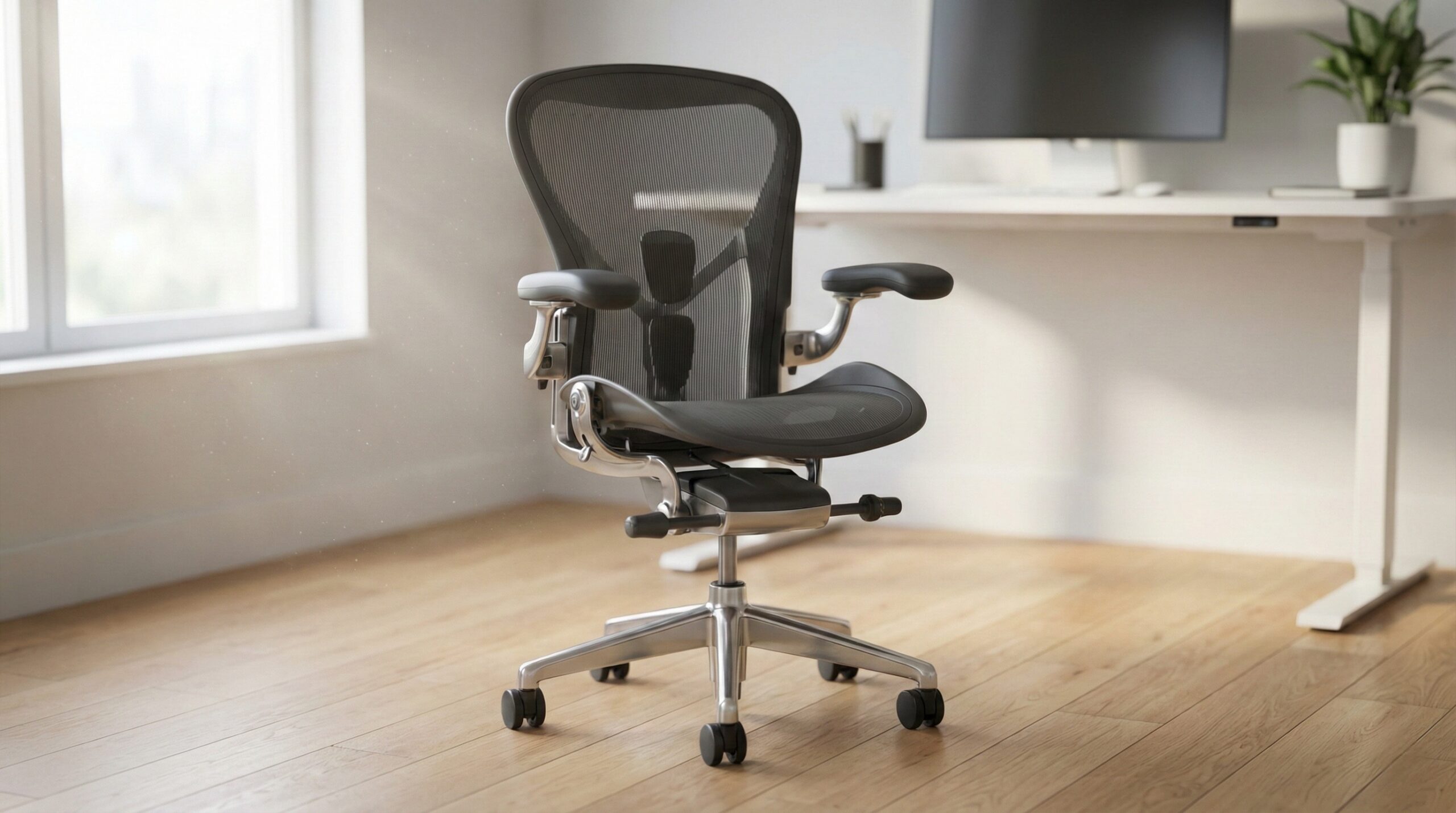
Herman Miller Aeron Size B Office Chair | Adjustable Arms |
Best for: A typical 5’6″–6’0″ home office worker with lower back pain who wants a supportive chair for long desk days and frequent posture changes (typing upright, then reclining for calls).
The Good
- Ergonomic “platform” that rewards correct setup: the Aeron is widely used in offices because it can keep you supported when you’re sitting fully back (instead of perching on the seat edge, which often aggravates low-back discomfort).
- Usable tilt and recline controls: being able to recline smoothly — and set tension so the chair supports you rather than dropping you — helps you vary posture during the day (a key principle in most ergonomics guidance).
- Breathable mesh feel: mesh can be a plus if you run warm, and many people prefer the more “suspended” support over thick foam that can compress over time.
- Community longevity reputation: long-running owner anecdotes often mention multi-year durability when the chair is in good condition.
The Bad
- Refurb/renewed variability is real: user reports include chairs arriving “like new,” but also complaints about broken levers or non-working tilt cables depending on the seller and batch.
- Fit is not universal: Aeron sizing matters; Size B fits many people, but if you’re very petite or broad-shouldered / taller, you may need a different size to avoid weird pressure points.
- Not everyone loves mesh support: if you prefer a plush seat, the Aeron can feel firm or “different,” especially if you’re coming from thick foam.
4.1/5 across 42 Amazon reviews
“I was skeptical with the reviews, but the only sign of use was that it was partially assembled.” — Verified Amazon buyer (5 stars)
“Purchased the HM Aeron size B from these guys with full knowledge knowing they were refurbished, but man are they CHEAP. Lever handle broke off almost immediately, cable for leaning function never worked from the start, and they never sent a cover for the bottom cable assembly. After all the chair issues comes the biggest, the customer service. They are…” — Verified Amazon buyer (1 stars)
Typical price: $650 – $700
“Yes, Herman Miller Aeron chair for the win! I have one for the home office for years now after having one at work.” — r/BuyItForLife discussion
“it came in yesterday and I have to say I am happy with my purchase. The chair looks practically new and I believe most of the parts are brand new.” — verified buyer, 5 stars
Our Take: If you want the safest “buy once, set it up right, and use it for years” option for lower back pain, the Aeron is a strong pick — just be choosy about seller/refurb quality and make sure Size B is actually your size.
Branch Ergonomic Chair Pro Mesh Office Chair
Best for: A dual-monitor home office setup where you want lots of adjustability and breathability for 4–8 hour days, but you’re not trying to spend flagship-chair money.
The Good
- Adjustment-forward design: buyer feedback regularly highlights that there are “lots of adjustment points,” which is what you want when you’re trying to match lumbar support to your back rather than forcing your back to match the chair.
- Mesh build for airflow: a good fit if you dislike heat buildup on long sitting sessions.
- Good early comfort impressions: multiple user reports describe being pleased in the first weeks — a helpful sign for initial ergonomics comfort (though long-term durability is a separate question).
- Modern, office-friendly look: if your desk is in a living room or shared space, it reads more “professional” than gamer-style chairs.
The Bad
- Seat support may not work for everyone: some buyers specifically mention the seat cushion feeling like it’s compressing too much, especially toward the back portion of the seat.
- Value expectations can vary: at this price, some shoppers expect a more premium seat feel and more “refined” mechanisms.
4.3/5 across 115 Amazon reviews
“I bought this chair a couple weeks ago and have been very pleased so far. My husband assembled it so I can’t comment as to how easy it was, except that it was all ready and waiting for me when I got home the first day after delivery:). This was my first "ergonomic chair" after a couple old office supply store specials. (I also bought a footrest that’s…” — Verified Amazon buyer (5 stars)
“Overall a good chair, but not quite what I expected from a $500 chair.Coming from my last chair which was a cheap $100 chair, I would say this is definitely an overall upgrade. There’s just some things I would improve.The seat:My biggest gripe and concern is the cushion. It is comfortable and an upgrade frombmynlast chair, but the back portion of the seat…” — Verified Amazon buyer (4 stars)
Typical price: $500 – $550
“# Branch Ergonomic Chair Pro **Pros:** * Minimal and professional design
* adjustable for height, tilt, and armrests” — r/sysadmin discussion
“My biggest gripe and concern is the cushion. It is comfortable and an upgrade frombmynlast chair, but the back portion of the seat feel like it’s bottoming out.” — verified buyer, 4 stars
Our Take: The Branch Ergonomic Chair Pro is a solid “many-adjustments, mesh comfort” choice, but if you know you’re sensitive to seat-pan support (or you sit 8–10 hours daily), pay extra attention to return terms and do a real multi-day test.
FAQ
What chair features matter most for lower back pain?
In plain terms: lumbar height adjustability (so the support hits the curve of your lower back), seat depth adjustability (so you can sit fully back without the seat digging into the backs of your knees), and a recline/tilt system you’ll actually use (so you can change posture throughout the day). OSHA’s workstation guidance emphasizes adjusting the chair to support the lower back and allow comfortable posture changes; see OSHA computer workstations eTool.
How do I set lumbar support correctly?
Start with lumbar positioned at the natural curve of your lower back (not mid-back). Then adjust it gradually until it feels supportive without pushing you forward or increasing pain; give it a few days and re-check. If your pain is persistent, radiating, or worsening, it’s worth checking in with a clinician such as a physical therapist or an occupational therapist.
What seat depth is right if my lower back hurts?
Sit all the way back so your pelvis is against the backrest, then check the gap behind your knees: you generally want about 2–3 fingers of space. Too deep often forces you to slouch (losing lumbar contact), and too shallow can reduce thigh support and make you perch — both can irritate the low back over time.
Is recline actually important for desk work?
Yes. Evidence-based ergonomics guidance commonly recommends varying your posture to avoid holding one static position all day; a chair with smooth recline and controllable tilt tension makes that realistic in a workday. For general ergonomics and musculoskeletal disorder prevention concepts, see NIOSH ergonomics resources.
Mesh vs. foam: which is better for lower back pain?
Neither material is automatically “better.” What matters is whether the chair maintains consistent support through the day and over months of use. Foam that bottoms out can change your pelvic position; mesh that sags can reduce support — either way, your lower back may end up doing more work than it should.
Can an office chair fix my lower back pain by itself?
A chair can reduce aggravating factors, but it’s rarely a complete fix. Desk height, monitor position, keyboard/mouse reach, and movement breaks all matter, too. If your pain is significant or persistent, consider guidance from a certified ergonomist or occupational therapist and look at broader workstation setup recommendations like the OSHA workstation guide.
Should I buy a refurbished chair for back pain?
It can be a great value if the refurbishment is high quality, because premium chairs tend to have better tilt mechanisms and more durable support systems than many new budget options. The risk is variability: inspect promptly, test every lever/tilt function, and use sellers with clear return policies. User reports on renewed chairs can range from “practically new” to reports of broken controls, so protect yourself with a good return window.
Bottom Line
If you’re trying to reduce lower back pain while working from home, the chair that tends to work best is the one you can adjust to your body: lumbar that lands in the right spot, a seat depth that lets you sit fully back, and recline that supports posture changes. Among the picks here, the Herman Miller Aeron (Size B) is our top overall choice for most people because it’s a proven ergonomic design with supportive tilt controls — just be careful about refurb/renewed condition and make sure the sizing fits you.
Affiliate disclosure: This page includes affiliate links. Purchases through these links support our work at no added cost.